Close All Windows v6.1 (x64/x86) + Fix {CracksHash}
About Close All Windows v6.1 (x64/x86) + Fix {CracksHash}
Overview
Visit for more apps - CracksHash Close All Windows v6.1 (x64/x86) + Fix {CracksHash} CloseAll is a very simple and straightforward application that comes with a single, clear purpose: it lets you quickly and easily close multiple applications at the same time. Unlike typical task managers capable of ending processes only one by one, CloseAll can close specific selections of multiple running apps in a single move. Its interface displays all running apps, letting you select which ones you want to
Frequently Asked Questions
How do I download Close All Windows v6.1 (x64/x86) + Fix {CracksHash}?
Click the magnet or torrent download button on this page to start downloading Close All Windows v6.1 (x64/x86) + Fix {CracksHash}. A BitTorrent client is required.
What is the file size of Close All Windows v6.1 (x64/x86) + Fix {CracksHash}?
The total size of Close All Windows v6.1 (x64/x86) + Fix {CracksHash} is 6.3 MB.
How many seeders are available for Close All Windows v6.1 (x64/x86) + Fix {CracksHash}?
Close All Windows v6.1 (x64/x86) + Fix {CracksHash} currently has 29830 seeders, which affects download speed.
What category is Close All Windows v6.1 (x64/x86) + Fix {CracksHash} in?
Close All Windows v6.1 (x64/x86) + Fix {CracksHash} is listed under Applications on 1337x.
Visit for more apps - CracksHash

Close All Windows v6.1 (x64/x86) + Fix {CracksHash}
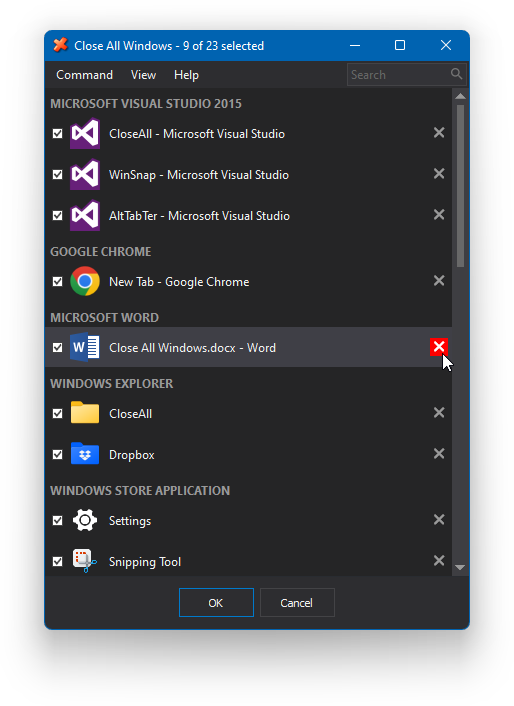
CloseAll is a very simple and straightforward application that comes with a single, clear purpose: it lets you quickly and easily close multiple applications at the same time. Unlike typical task managers capable of ending processes only one by one, CloseAll can close specific selections of multiple running apps in a single move. Its interface displays all running apps, letting you select which ones you want to be closed. By default, all running apps are selected for being closed, so pay attention when using this tool so that you won't close apps that you wanted to stay running.
CloseAll is also very lightweight and doesn't consume any system resources at all. Once it does its job and it closes the selected app, CloseAll also closes itself. Its interface is very simple to use and it also allows sorting and grouping the running tasks by various criteria.
There's not much to say about this tiny utility. Both its purpose and its functionality are far from being complex or complicated, and best of all, it's also free. So if you consider starting to use a tool to help you quickly close running apps, CloseAll will be perfect for the job.
Instructions and fix are provided in the files
Virus Total links -
Setup - https://www.virustotal.com/gui/file/748025509a4646324ae5c7a470c0c770d94d8b1ce26578ba46f57adfcc1c177a
Crack - https://www.virustotal.com/gui/file/3260fe6243d55b70972e84091e2c57ba0d8ce2c4c0e0fbd7c31a56ebb408b20d