Auslogics SSD Optimizer Pro 2.2.0.6 Multilingual-[Waseem]
About Auslogics SSD Optimizer Pro 2.2.0.6 Multilingual-[Waseem]
Overview
SSD Optimizer is a dedicated tool designed specifically to maximize the efficiency of your solid-state drive and elevate its performance to another level. Key Features: Enhance SSD Performance -Enjoy essential options that allow you to optimize drive maintenance, file and system core operations, as well as system services. SSD optimization helps reduce the number of write operations and extend the drive’s service life. Improve Space Management -SSD drives tend to be smaller in size than HDDs, wh
Features
Enhance SSD Performance -Enjoy essential options that allow you to optimize drive maintenance, file and system core operations, as well as system services
Frequently Asked Questions
How do I download Auslogics SSD Optimizer Pro 2.2.0.6 Multilingual-[Waseem]?
Click the magnet or torrent download button on this page to start downloading Auslogics SSD Optimizer Pro 2.2.0.6 Multilingual-[Waseem]. A BitTorrent client is required.
What is the file size of Auslogics SSD Optimizer Pro 2.2.0.6 Multilingual-[Waseem]?
The total size of Auslogics SSD Optimizer Pro 2.2.0.6 Multilingual-[Waseem] is 26.5 MB.
How many seeders are available for Auslogics SSD Optimizer Pro 2.2.0.6 Multilingual-[Waseem]?
Auslogics SSD Optimizer Pro 2.2.0.6 Multilingual-[Waseem] currently has 25405 seeders, which affects download speed.
What category is Auslogics SSD Optimizer Pro 2.2.0.6 Multilingual-[Waseem] in?
Auslogics SSD Optimizer Pro 2.2.0.6 Multilingual-[Waseem] is listed under Applications on 1337x.
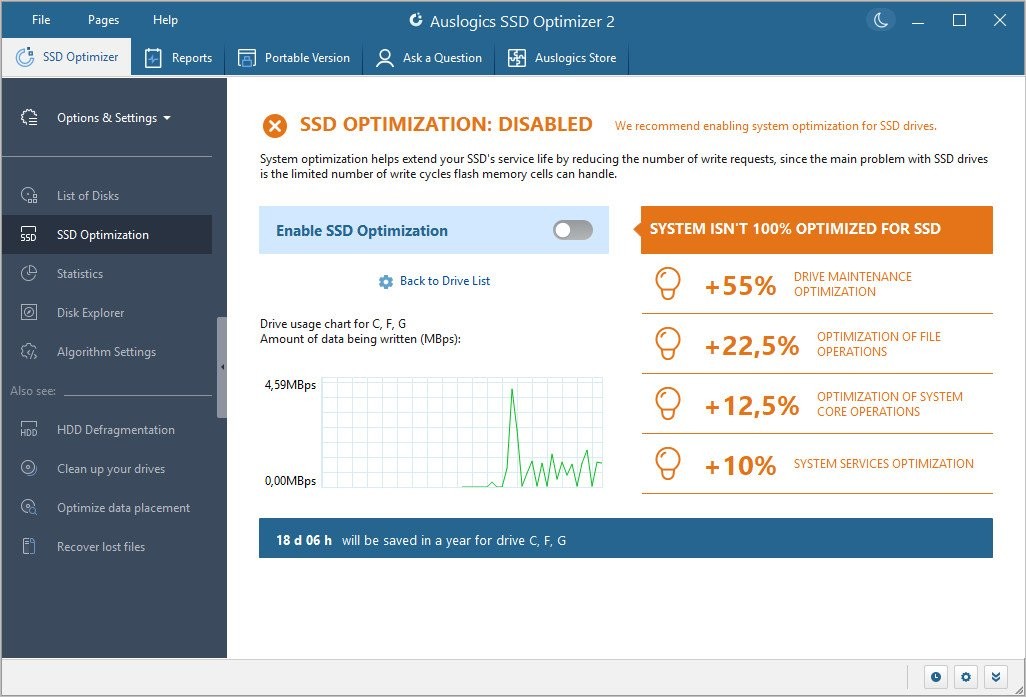
SSD Optimizer is a dedicated tool designed specifically to maximize the efficiency of your solid-state drive and elevate its performance to another level.
Key Features:
Enhance SSD Performance
-Enjoy essential options that allow you to optimize drive maintenance, file and system core operations, as well as system services. SSD optimization helps reduce the number of write operations and extend the drive’s service life.
Improve Space Management
-SSD drives tend to be smaller in size than HDDs, which is why it is especially important to keep files on them sorted and cleaned up on a regular basis. Disk Explorer lets you find the biggest space hogs and move them to another storage device, allowing you to get more storage for more important files.
Check SSD Health
-SSD Optimizer allows you to check your SSD health, view the amount of data being read from and written to your SSD drive, and access other real-time data on the drive’s status. Choose the time period to display the stats for and see the drive’s estimated service life.
Run Scheduled Optimization
-SSD Optimizer allows you to customize the frequency and timing of scheduled optimization to suit your needs. By scheduling optimization, you can ensure that your SSD remains in optimal condition without the need for constant monitoring.
Perform Quick Disk Cleanup
-With SSD Optimizer, you can clean up junk on your drive before running optimization, so that less data is being moved around during the operation.
https://www.virustotal.com/gui/file/13de8a27c69368a7b397878e5612b47a0ff036cd79e57e1f96c766da0443bbda