MadPeel AI Background Remover 1.0.2 Fixed[FixFiles]
About MadPeel AI Background Remover 1.0.2 Fixed[FixFiles]
Overview
Remove backgrounds from any image. Clean up edges. Add shadows. Export for Instagram, Amazon, Etsy, or anywhere else. Remove backgrounds from any image in seconds with professional AI precision. 100% offline, 100% private. MadPeel never uploads your photos to the cloud. Everything runs locally on your PC. Built for people who remove backgrounds and hate paying monthly for it. E-commerce sellers You list products on Amazon, Etsy, or Shopify and need clean white backgrounds. You don't want to pay
System Requirements
OS: Windows 10 version 17763
Frequently Asked Questions
How do I download MadPeel AI Background Remover 1.0.2 Fixed[FixFiles]?
Click the magnet or torrent download button on this page to start downloading MadPeel AI Background Remover 1.0.2 Fixed[FixFiles]. A BitTorrent client is required.
What is the file size of MadPeel AI Background Remover 1.0.2 Fixed[FixFiles]?
The total size of MadPeel AI Background Remover 1.0.2 Fixed[FixFiles] is 1.7 GB.
How many seeders are available for MadPeel AI Background Remover 1.0.2 Fixed[FixFiles]?
MadPeel AI Background Remover 1.0.2 Fixed[FixFiles] currently has 21348 seeders, which affects download speed.
What category is MadPeel AI Background Remover 1.0.2 Fixed[FixFiles] in?
MadPeel AI Background Remover 1.0.2 Fixed[FixFiles] is listed under Applications on 1337x.
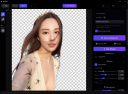
Remove backgrounds from any image. Clean up edges. Add shadows. Export for Instagram, Amazon, Etsy, or anywhere else. Remove backgrounds from any image in seconds with professional AI precision. 100% offline, 100% private. MadPeel never uploads your photos to the cloud. Everything runs locally on your PC.
Built for people who remove backgrounds and hate paying monthly for it.
E-commerce sellers
You list products on Amazon, Etsy, or Shopify and need clean white backgrounds. You don't want to pay per image or sign up for a subscription just to remove backgrounds from your product photos.
Small business owners
You update your website, social media, or marketing materials yourself. You need professional-looking images without hiring a designer or paying for Photoshop every month.
Content creators
You make thumbnails, social posts, or graphics and need cutouts fast. MadPeel gives you clean removals with edge refinement and shadow tools without uploading your images to someone else's server.
Designers and photographers
You do client work and need batch processing. Drop 50 images in, pick a model, and let it run. Refine the tricky ones by hand with the brush tool. Export everything in one go.
Everything you need to remove backgrounds. Nothing you don't.
Three AI models for different jobs
BiRefNet for products and objects with sharp detail. BiRefNet Portrait for people with clean silhouettes. Portrait Mode for headshots where you need soft, natural edges around hair. Pick the one that fits the image. Switch anytime.
Edge refinement and shadow tools
Sharpen edges, expand or shrink the cutout, feather for a softer look. Add a drop shadow with controls for blur, distance, angle, and opacity. Small touches that make the difference between a cutout and a finished image.
Export presets for everywhere you post
Instagram, TikTok, Facebook, Pinterest, YouTube, Amazon, Shopify, Etsy, eBay. Sprite sheets from 64x64 to 1024x1024 for game assets. Pick a preset and the image gets sized and formatted correctly. Export as PNG, JPEG, or WebP. No guessing dimensions.
Batch processing
Drop a folder of images in and process them all at once. Flip through results in the filmstrip, touch up any that need it, and export the whole batch. Good for product catalogs, team headshots, or any job with more than a handful of images.
Fix it by hand when you need to
The AI gets it right most of the time. When it doesn't, use the brush tool to add or remove parts of the mask. Zoom in, adjust the brush size, and fix exactly what needs fixing. You're not stuck with whatever the model gives you.
Your images stay on your computer
MadPeel runs on your desktop. Your photos never get uploaded to a server. The AI models are built into the app. Everything happens on your machine. No internet needed after you install it.
Release Notes
System Requirements
- OS: Windows 10 version 17763.0 or higher
- Memory: 4 GB (Minimum), 8 GB (Recommended)
Virustotal
Setup: https://www.virustotal.com/gui/file/a743bbab6125a902c8a95818f7d9d34715ae16ef2cb52927bf192a36c03a2039
Triage:
Setup: https://tria.ge/260721-rw3bmaah86/static1