EasyUEFI Enterprise v6.4.0.2 WinPE (By Hasleo) {CracksHash}
About EasyUEFI Enterprise v6.4.0.2 WinPE (By Hasleo) {CracksHash}
Overview
Visit for more apps - CracksHash EasyUEFI Enterprise v6.4.0.2 WinPE (By Hasleo) {CracksHash} EasyUEFI owns comprehensive EFI/UEFI boot option management functions, such as create, delete, edit, clean up, backup and restore EFI/UEFI boot options, specifies an one-time boot entry for the next restart, or change EFI/UEFI boot order, all these operations done under Windows without entering BIOS setup. Features :- Create, Delete and Modify EFI/UEFI Boot Option Backup & Restore EFI/UEFI Boot Optio
Features
Create, Delete and Modify EFI/UEFI Boot Option Backup & Restore EFI/UEFI Boot Option Disable & Enable EFI/UEFI Boot Option Boot Into UEFI firmware settings (UEFI BIOS) From Inside Windows Specifies an One-time Boot Option Change EFI/UEFI Boot Sequence Command line support EFI system partition management EasyUEFI also releases a feature which allows you to manage the EFI System Partitions, with this feature you can easily backup, restore, rebuild the EFI System Partition (ESP), or move EFI System Partition from one drive to another
Frequently Asked Questions
How do I download EasyUEFI Enterprise v6.4.0.2 WinPE (By Hasleo) {CracksHash}?
Click the magnet or torrent download button on this page to start downloading EasyUEFI Enterprise v6.4.0.2 WinPE (By Hasleo) {CracksHash}. A BitTorrent client is required.
What is the file size of EasyUEFI Enterprise v6.4.0.2 WinPE (By Hasleo) {CracksHash}?
The total size of EasyUEFI Enterprise v6.4.0.2 WinPE (By Hasleo) {CracksHash} is 760.0 MB.
How many seeders are available for EasyUEFI Enterprise v6.4.0.2 WinPE (By Hasleo) {CracksHash}?
EasyUEFI Enterprise v6.4.0.2 WinPE (By Hasleo) {CracksHash} currently has 16460 seeders, which affects download speed.
What category is EasyUEFI Enterprise v6.4.0.2 WinPE (By Hasleo) {CracksHash} in?
EasyUEFI Enterprise v6.4.0.2 WinPE (By Hasleo) {CracksHash} is listed under Applications on 1337x.
Visit for more apps - CracksHash

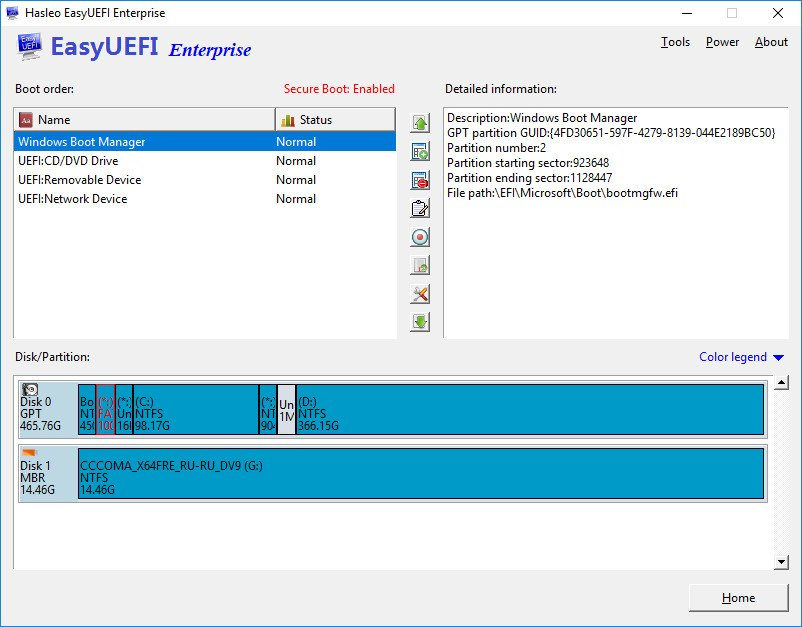
EasyUEFI Enterprise v6.4.0.2 WinPE (By Hasleo) {CracksHash}
EasyUEFI owns comprehensive EFI/UEFI boot option management functions, such as create, delete, edit, clean up, backup and restore EFI/UEFI boot options, specifies an one-time boot entry for the next restart, or change EFI/UEFI boot order, all these operations done under Windows without entering BIOS setup.
Features :-
Create, Delete and Modify EFI/UEFI Boot Option
Backup & Restore EFI/UEFI Boot Option
Disable & Enable EFI/UEFI Boot Option
Boot Into UEFI firmware settings (UEFI BIOS) From Inside Windows
Specifies an One-time Boot Option
Change EFI/UEFI Boot Sequence
Command line support
EFI system partition management
EasyUEFI also releases a feature which allows you to manage the EFI System Partitions, with this feature you can easily backup, restore, rebuild the EFI System Partition (ESP), or move EFI System Partition from one drive to another.
Backup EFI System Partition
Restore EFI System Partition
Recreate EFI System Partition
Move EFI System Partition to Another Drive
Manage EFI system Partitions
Create Windows PE emergency disk
With EasyUEFI you can also build a bootable Windows PE image file. After building the image file, you can use it to create a bootable USB flash drives or use 3rd-party burner software to burn it to CD/DVD. With this Windows PE emergency disk you can easily fix EFI boot issues or repair efi system partition, such as missing or corrupt EFI boot option, missing or corrupt EFI System Partition.