WinPE MCBoot VN 2025 v11.0 build 270625 Pro (x64) {CracksHash}
About WinPE MCBoot VN 2025 v11.0 build 270625 Pro (x64) {CracksHash}
Overview
Visit for more apps - CracksHash WinPE MCBoot VN 2025 v11.0 build 270625 Pro (x64) {CracksHash} WinPE MCBoot VN is a bootable Windows PE‑based (WinPE) toolkit designed to install, deploy, diagnose, and repair Windows systems (both Desktop and Server). It offers a comprehensive set of tools including antivirus scanners, disk partitioning and cloning utilities, file recovery software, and system diagnostics. Additionally, it includes portable office applications (such as Word/Excel editors and PDF
Features
Boot tool for two MBR standards – legacy and UEFI-GPT - Grub4 for Dos menu with many useful software to fix Windows errors, reset password
Frequently Asked Questions
How do I download WinPE MCBoot VN 2025 v11.0 build 270625 Pro (x64) {CracksHash}?
Click the magnet or torrent download button on this page to start downloading WinPE MCBoot VN 2025 v11.0 build 270625 Pro (x64) {CracksHash}. A BitTorrent client is required.
What is the file size of WinPE MCBoot VN 2025 v11.0 build 270625 Pro (x64) {CracksHash}?
The total size of WinPE MCBoot VN 2025 v11.0 build 270625 Pro (x64) {CracksHash} is 4.3 GB.
How many seeders are available for WinPE MCBoot VN 2025 v11.0 build 270625 Pro (x64) {CracksHash}?
WinPE MCBoot VN 2025 v11.0 build 270625 Pro (x64) {CracksHash} currently has 55 seeders, which affects download speed.
What category is WinPE MCBoot VN 2025 v11.0 build 270625 Pro (x64) {CracksHash} in?
WinPE MCBoot VN 2025 v11.0 build 270625 Pro (x64) {CracksHash} is listed under Applications on 1337x.
Visit for more apps - CracksHash

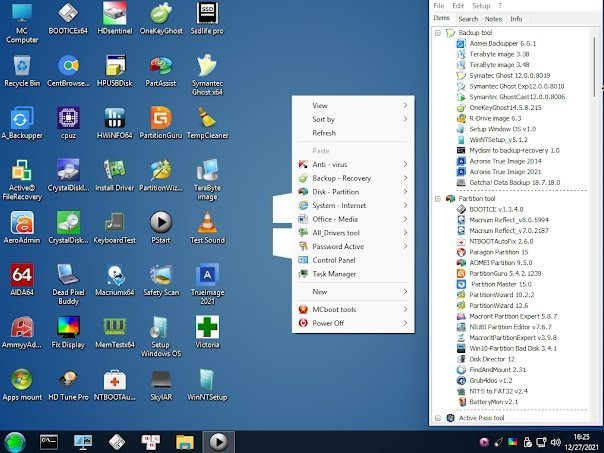
WinPE MCBoot VN 2025 v11.0 build 270625 Pro (x64) {CracksHash}
WinPE MCBoot VN is a bootable Windows PE‑based (WinPE) toolkit designed to install, deploy, diagnose, and repair Windows systems (both Desktop and Server). It offers a comprehensive set of tools including antivirus scanners, disk partitioning and cloning utilities, file recovery software, and system diagnostics. Additionally, it includes portable office applications (such as Word/Excel editors and PDF viewers), allowing users to perform document editing and viewing directly within the PE environment. Whether you're restoring a backup, removing malware, or managing drives, MCBoot provides a powerful all-in-one rescue solution.
Features
- Boot tool for two MBR standards – legacy and UEFI-GPT
- Grub4 for Dos menu with many useful software to fix Windows errors, reset password....
- Win Pe includes: PE Win 11, Win 10, Win 8.1, XP
- Win mini xp: supports low configuration computers
- Support Touchpad driver for Intel gen 9-13,14 laptops
- Good support for Intel Gen14 and AMD 8000 machines
- Support loading Admin using temviewer,
- Support Unlock Bitlocker function (unlock with Key)
- Support virus scanning (Kaspersky rescue, Avira rescue, Eset, Dr.Web)
- Good support for recognizing M.2 SSD drives of NVMe lines: AHCI_RAID- AMD_RAID
- Supports Microsoft Net Framework and C++ to support installation of demanding software
- Support installing win directly on win pe and fix bypass 2.0 on win 11
- Support Wifi driver, fully integrated Touchpad for HP, Dell, Asus, Aser, Macbook Pro, Msi laptops..
- Support Camera Test, Microphone test, Remote control connection with Ultraiview, Mstsc.
- Supports phone connection and network sharing from phone to computer
- Support Phone Connection (MTP) Share data via phone
- Support phone connection (RNDIS) Share network power phone accessories
- Support ISCSI disk storage technology to connect to the server
- Support removing USB to open application and still work well
- Support Adding WinPE to Windows Menu (Select drive: C,D,E.. to save WinPE and Apps)
- Support to remove USB-HDD box, the application can still work well (see video instructions in the article).
Features between Free and Pro
- The Free edition is a capable bootable WinPE recovery tool with standard drivers and basic rescue utilities—suitable for general diagnostics and simple tasks.
- The Pro edition expands significantly with advanced hardware support, enterprise-level recovery tools, remote support capabilities, BitLocker unlocking, seamless hardware persistence, and direct OS installation — making it far more versatile for IT professionals and advanced users.

Quote: